Thursday, February 19, 2009

Things not to do while blogging

You must have learned about a number of things that should be done for making a blog popular. In my last post i also wrote about blog promotion basics.Have you heard about anything that should not be done. Usually bloggers make some common mistakes in their blogs which makes their blog looking more unprofessional and unattractive.
Here are some of the thing which you should avoid while blogging

1.Keep you layout clean. Don't put ads, ads and only ads on it. It makes your blog looking like money eating machine. You should give preference to the accessibility of your blog. Like how easy it is to access your blog and move from post to post?

2.Do not use drop down menus. Use a open list with posts clearly mentioned. A list attracts people to read more and hence increases your visits times.

3.Do not keep things in dark. Make your first post available first or keep an intro of your blog at the top. It makes other people understand what you are offering on your blog. This might stop some not so interested people visiting your blog but this will generate a new and positive interest in your first time visitor. And as you know, unique visits are always important.

4.Do not use large images. Use small or images with good quality of average size. It makes your blog page loading fast and save your visitor from irritated waiting.

5.Do not post without labels. Your labels or tags are your keywords. Just highlight them in your post by making them bold and linking to them. Make a tag or label cloud.

I hope these tips will help you.

Tuesday, February 10, 2009

Blog promotion basics

<meta equiv="CONTENT-TYPE" content="text/html; charset=utf-8">

Here goes some most important and basic things for your blog promotion. These should be on your blog or with your blog to make the traffic continuously flowing to your blog.

  1. Keywords: Set your keywords first. Keywords plays a major role in recognition of blog Highlight your keywords by using bold and header tags around them. This makes them looking more important to search engine crawlers.

  2. RSS feeds : Generate RSS feed of your blog and make them available to visitors of your page by adding tool on your blog page. You can use feedburner for this purpose or inbuilt tools of blog. It will automatically generate feeds and make the thing easily available to you. For more details check this post on feedburner.

  3. Keep stats: Add some tool for checking the stats of your blog like daily visitors, geographical visits, bounce rate etc. You can use google analytics which is a too good tool for keeping stats or any other tool like statcounter etc. For adding google analytics in blogger account you can check this post.

  4. Bookmarking : Social bookmarking help you a lot in generateing traffic and getting lot of regular visitors. So add a bookmarking tool on your blog . This is already available on some blog service or you can use addthis tool for this. It is easy to add in your blog. For more help read this post about how to add bookmarking button?

  5. Email subscription : Some of your visitors would like to keep themselves updated with your posts. For them, you can add a email subscription tool or widget on your blog. This you can get by feedblitz and can add it very easily.

  6. Label cloud: Tags or label cloud is much important in showing up what are most highlighted ones in your posts. This attracts visitors to read your more posts. You can add this easily from in built features of blogger. This post can help you to add one on your blog

  7. Post density : The most important things that can make your blog popular is regular posts. Always post at least 2-3 post in a week. This is much important when you have started a new blog. Later you can continue with less posts but in starting it is must.

  8. Post Content: Have you read ever that Content is King. Its is damn right. You have to write but not like anything. Keep things on a track. Don't post out of your blog topic. This will distract your visitors. Always write a good content, you can read here more about how to write good content?

So these are the things which can help you to make your blog more popular. And as you people know, only popularity can bring you money and more money. And next post i will tell you more about promoting your blog.

Sunday, February 1, 2009

Search engine friendly URLs

My friends, this time I will continue with the same things that I started in my last post i.e e Engine Friendly URLs. Last time it was all about difference in static and dynamic URLs. So have a take on something more this time.

So as you people know keywords tells people and search engines about what your web page is? Similarly key phrases tells people what is specifically on your page. So instead of using keywords in your page URL ,use key phrases as more descriptive one. Have you ever checked URLs of blogger posts? Aren't they much more descriptive and informative.

Lets take a example of a website having page for fast link building and the inner page with fast resiprocal link building tips.The URl of page will be like this ,if you are using keyword only

http://www.mypage.com/link-building/resiprocal.html

And you use keyphrase than it will be like

http://www.mypage.com/link-building-basics/fast-resiprocal-link-building-tips.html

So which one is more informative and attractive? Obviously second one. It not only helps better search engine indexing but also let the search engine user know more about your page. But keep the basic rule in mind always, content should be relevant to the things your are writing in your URL.

Tip of the day : Always use hyphens (-) instead of underscores (_)in your URL.

Tuesday, January 27, 2009

Promotion by URLs

As you have already read about keywords in my previous post, this time i am going to discuss about directing keywords through URLs. URLs should be static always. Static here doesn't means that there should come .html or .htm after every page's URL. It simply means that the URL should contain typically understandable format of words.

Usually if your site is using a dynamic code, than the Url for a category of black colour cars having Audi model, will generate like

http://www.somesite.com/index.php?cPath=32&osCsid=1c2a1fb557c5b04

http://www.somesite.com/itemcat.asp?cid=product%20category

So its recommended to use url like

http://www.somesite.com/black-colour-car/audi-2008-version.html
http://www.somesite.com/black-colour-car/audi-2008-version.asp
http://www.somesite.com/black-colour-car/audi-2008-version.php

Changing dynamic URL's in static ones is easily possible by Url redirecting scripts and server side changes. Your developer can make it easily or you can find out help, on internet easily.

Now the most important things, as you have decided keywords ,you should keep your filenames as your keywords are. It helps the search engine crawlers to keep the track of your page easily and becomes very much useful for indexing. This way simply promotes your website keywords.

Wednesday, January 21, 2009

list for online marketing and SEO tasks

Hello my friends, i hope you people are doing well. From some days i was working on the marketing of some website related to a big IT company. As these sites were from a professional company so i had to perform the work in a professional manner like preparing lots of reports for them as present site status reports, site structure reports, scheduled marketing plans etc. As i already did these things also for some other sites, i was enough ready for the task. But i wanted to know more from different sources to get an idea for making a brilliant list for online marketing and SEO tasks. I posted some threads thereafter on different forums, but they didn't worked too much for me. So finally i am posting here a list prepared by me for online marketing and SEO tasks. Make a review of it and let me know if you can add something more in this, and make it a brilliant one. I hope it may help you people somewhat as a checklist or planning list for online marketing and SEO.

Task Sub Task


Onsite Actions
Keyword Research

Competetive Analysis

By various tools
Content search & writing
E-mail ids details
Ftp details
Site structure analysis


Finalisation Process
Keyword finalising
Content finalising
Site structure recommendations
E-mail response system


Site copy finalising
On page optimization

Meta tags adding

Meta content

Anchor text

Title setting

robots.txt

XML sitemap

GA code

SEF urls


Off page optimization

Blog writing/ submission

Article writing / submission

Directory submission

Press release

Link building process

Feeds

RSS

Search engine submission

Social netwroking sites adding

Groups creation

Forums participation

Email lists searching

Email campaigns

Customer's email lists

Groups mailing

White papers


Funnel Setup
Search Engine Campaigns Paid


Monthly evaluation
Adjustment of meta tags
Content Updation
Broken link check
GA recommendations & workouts
Strategy checkup & review


Tuesday, January 13, 2009

how to write good content?


This post is totally dedicated to how to write a good content for your blog or website?
So first thing that affect content is keyword. Even you people might not be aware about keywords but you should know a little bit about them. Keywords are those target words, about which your content is and from that people reach to your blog or website. Like, if you are writing about “make a cheese pizza” than the words “cheese and “pizza” are your keywords.

One thing that you should know is “content is always king”. If you are really writing good content than no one can avoid your blog or website. People will surely like to read you but search engines are not as same. They are machine codes so they always look for something relevant about your topic in your content. So you have to make your keywords looking more important in your content. You have to highlight them not by coloring them, but by making some small changes in their styles like making them bold or using heading tags around them. These shows search engines that your content is totally about the keyword that they are looking for.
One thing that you should keep in mind is not to write too many keywords in your content. It is considered as “keyword stuffing” or in simple words, pushing of non useful things inside. Search engines never takes such a contents seriously which have too many and repeated things written. So write enough but do not push much.
Well that’s for now, in next post I will tell you more about making your content and killer content :) .

Tuesday, December 2, 2008

How to make more money from adsense

Adsense is good enough service to earn money from your blog or website. It is enough easy to install and it has much more choice to do place ads as you like. Here are some tips for placing adsense which can help you to earn better money from adsense.

1. Blend the adsense ads with your template color and style. It helps to merge the ads with your content and look like some helpful links.

2. Use the ads after your each blog post.

3. Use text links at the top below your logo. Text ad in a single line will work best.

4. Use image ads placed parallel to your logo.

5. Make checks for each ad unit and study them. Check which ad unit has highest eCPM. You can check eCPM from the details of check. Try to make efforts towards that ad unit so that it can attract more visitors.

I hope these tips will help you in generating more from adsense.

Saturday, November 29, 2008

How to add adsense in blogger

When your blog starts getting enough visitors, you will surely love to add some money bringing things in it. So what about adsense. It’s easier to add and much easier to keep on. And biggest thing is that you don’t need to worry about deciding cost of space on which ads will be published. Well here are the steps to add adsense in your blogger account. Easiest than ever it was….

1. Go to your blogger dashboard and click on “layout” link.

2. Than go to “add a gadget” link.
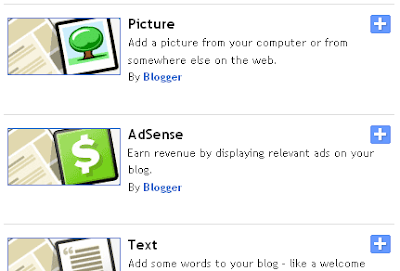
3. In a new window opened, you will find a link of adsense.

4. If you are not already signed up with adsense account than you will be redirected to a page where you can set up adsense account easily.
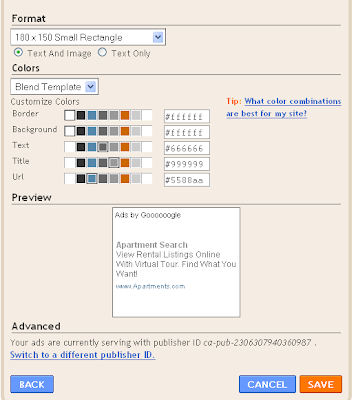
5. Now if you are already adsense user than on clicking “link for adsense”, a new browser window will open, you can see different type of adsense ads like size, color, and other attributes. You can choose the right size and type of ads from here like image ad, text ad or image/text ad

6. Choose and then click on the “save” button.
7. Now you are ready to show ads.

In next post, I will tell you about some really helpful adsense tips. These tips are helpful in getting more income from adsense and can be used on any blog account as blogger, wordpress or any website.

Thursday, November 27, 2008

List of online bookmarking sites

Social bookmarking is a effective medium to get visitors on your blog or website. Social bookmarking provides you quality traffic. Always those users will visit your blog or website who is interested in your topic and hence providing you quality traffic. And these visitors can convert easily further in your loyal visitors and can subscribe to your post or feeds. This will provide you a continuous traffic on usual days. Here is the list for popular social bookmarking websites. It will help you a lot in getting to the right places.

Digg.com

Del.icio.us

Yahoo! Buzz

Technorati.com

Propeller.com

StumbleUpon.com

Reditt.com

Sphinn.com

MyBlogLog.com

mixx.com

Fark.com

Slashdot.org

Kaboodle.com

Mister-wong

Furl.net

Clipmarks.com

Blinklist.com

Netvouz.com

Newsvine.com

Bloglines.com

Tailrank.com

Ma.gnolia.com

Dzone.com

Shoutwire.com

Simpy.com

Blogmarks.com

BlueDot.us

Mybookmarks.com

Spotback.com

Linkswarm.com

Spurl.net

Monday, November 24, 2008

Get more traffic, participate in forums

In my last post I provided some information about link building. Continuing the same topic I am dedicating this post to same “link building”. As I discussed before link building or getting back links from websites plays a major role in getting google PR and good ranking thus obviously more traffic.

A good way to get quality traffic and also better links at pages with good PR and ranks is to participate in forums of your niche. Forums do not allow usually to anyone to post their links. You first need to be their registered user, that is free and then participate actively in them. Some forums have conditions to post your link as your signature or in threads are to stay as their active user for at least 7 days or post at least 50 posts in threads. Signatures are the best ways to keep your links go all over the forum and only active user that follow the guideline can add their signature in end of their posts. Always keep in mind to follow the guide lines of forums and post something useful in it. It’s not the way only to get better link but also provides new idea to write about and more over free of cost tips to get more visitors.

Here I am listing some forums where I participate actively. These forums have good PR and google ranks. These are according to my niche but you can find out forums of your niche by easily putting some search in search engines like seo forums, management forums etc.

Digitalpoint forum – This forum is fastest growing forum in SEO and having good Pr, google and alexa ranks. You have to be a active user for 7 days to be able to add your links in your signature.

V7N forum – This is one of the oldest forums and provides nice and informative stuff. It also has good Pr, google and alexa ranks. You need to post at least 50 post to be able to add your links in your signature.

SEOchat forum – This is a good forum for beginners in online world.

Wednesday, November 19, 2008

How to do link building

Link building is a important task to make your blog or website popular. It attracts users as well as search engine rankings for your blog or websites gets affected positively by this. Among many ways to increase your blog or website’s links on internet, one popular way is to submit your blog to different directories. I have already provided some lists of blog directories where you can submit your blog just for free.

One important thing to mark here is, how much link building should be done in a day. Submitting hundreds of links a day to directories is quite not a better thing. Search engines takes these as spams. Although some SEO people recommends to place 2-3 links per day, but it’s better to submit 10-20 links per day to directories, as directories never lists you at the time you submits your link. They take some time to list you and hence automatically making your 2-3 links adding itself per day.

In case of forums or blog comments you should take care of not to spam. Always write something relevant to the topic on forums and comment wisely on blogs. I hope these tips will help you in better link building.

Tuesday, November 11, 2008

How to do link marketing or link baiting

To To make popular any blog or website, it’s very important to go for some link popularity efforts. Now you may think, what is link popularity or link baiting. Google always loves those website or blogs, which gets more relevant links from other sites and preferably one way links. So the more will your links on other website, more will be your link popularity. Link baiting is thus the process of getting links on other websites and blogs for your blog or website.
Some of the methods for getting link popularity are:

  • Commenting on blogs
  • SMO
  • Sending Link requests
  • Contributing in Forums

A powerful way to get one-way backlinks is by posting comments on blogs and leaving your link in there. You don't want to spam the blogs though because most owners check on their comments these days. So post something valuable and then post up your anchor text link back to your site. Blogs that are relevant to your niche and website work best always. Same things continues with other methods also.

Thursday, November 6, 2008

Blog submission directories list

This summary is not available. Please click here to view the post.

Saturday, November 1, 2008

How to add analytics in blogger

Today a small but very much helping thing. It’s not enough to write content and promote it. One most important thing is to check out how many people are coming on your blog, which pages they are looking most and how many times search engines crawlers coming and so on. These many stats you can get easily at your blogger account. Following are the steps for enabling google stats on your blogger account.

1.      Go to your blogger dashboard and at the bottom click on webmaster tools.

2.      This link will lead you to a page where you will find a link for “add a new site”.

3.      You just need to put your blog URL there and submit it.

4.      From onwards, google will start providing you different stats of your account.

Benefits: 

1.      The biggest benefit from stats would be your can check whether your efforts for promoting blog are going in a right way or not.

2.      It makes you keep count of technical issues regarding your blog like PR.

Keeping an account of readers or visitors makes you more directed to earn money from your blog. In further post I will describe how to add analytics in a website.

Friday, October 24, 2008

How to add bookmarking button or addthis button


In my earlier post I have told you about importance of SMO and social bookmarking in it. Social bookmarking tools are available on sites to add in your website or blog. One of the most popular button or tool is provided by addthis. Here are the steps for adding this in your website or blog.

1. 1.First go to addthis.com and select for the feature of “get your button”.

2. 2.On next page, you can select bookmarking button as according to your requirement. It will ask from you about where you want to put this button, like on blog or website.

3. 3.It will ask for type of button you want, like bookmarking or feed button. You can also select from button of different size.

4. 4.On submitting this form, it will ask to register you. It’s an easy process to b registered.

5. 5.This form submission will leads you to your blog account sign in page, if you have chose blogger, typepad etc.

6. 6.You can “sign in” in your blog account and it will simply add up there.

7. 7.If you want to add bookmark button on your website than a code will be provided to you by add this and you can easily add that in your content.

So these easy steps will add a bookmark button on your blog and make your visitors able to bookmark your website.

Thursday, October 23, 2008

Do SMO bring more traffic

Today I am going to write about one of the most interesting topics. It is about Social Media Optimization or SMO. SMO is the newly generated term in the field of search engine marketing and promotion. SMO is all about promoting your websites and blogs through Social Medias on net like RSS feeds videos and photo sharing, forums, social networking sites as facebook and social bookmarking sites as addthis. Biggest advantage of SMO is that it makes a way to mouth publicity where you are promoting not through friends or family but through the use of networking.

Forums: In this, you have to participate by answering question and asking some. Always add your blog or website URL at the bottom of your message as signature. Forums help you to bring quality traffic i.e. interested visitors. Participate in those forums which are related to your site or blog content. You can search for forums by putting a search in search engines.

Social Networking Sites: You can easily sign up in these sites and become a member. Search out for the group in these sites which matches your blog or website. Join as much group as you can. Keep talking to people and promote your site and blog there.

Social Bookmarking Sites: These are the sites by which you can add a button of bookmark or RSS feed, on your blog or website so that people, who are users of these sites, can bookmark your site to stay updated with content and coming back to your site or blog without any problem. This simply increases your number of loyal visitors and hence money. I have explained earlier in my post about RSS feeds.

Audio/video/photo sharing: You can share all this media content through websites like picasa

Here is the list of social networking sites that you can use to understand more.
http://en.wikipedia.org/wiki/List_of_social_networking_websites

Tuesday, October 21, 2008

Cheap way for regular earnings

You know people are making a lot of money online. Some from the websites and some from blogs, but I am much more concerned about making money by blogging. Some of the things made me interested in making money online by blogging which are not available in websites. Although I am earning from my websites also but blogging is better option for a regular money earning. Well here I am pointing out things which make earn money by blogging much better than from a website.

1. Making a blog is free.

2. No web development cost or coding problems. Blogging sites manages everything themselves.

3. 3. Regular money earning that is not possible easily in websites.

4. 4. More crawled by search engines.

5. 5.You can easily add it to a domain name, if you want to.

6. 6. If you have habit of writing little or more, you can earn.

7. 7. You can make thousands of blog and run them at a time. No need to waste your money in buying domain name or webspace.

8. 8. You can put any information of your choice like videos, images or text, without any page limit or space limit. People love to read and watch.

9. 9. You can promote your blog like website anywhere personally.

1010. Nothing like start from beginning. You can write and your blog starts getting visitors itself. You can easily put any number of tools in it and also number of links.

So keep writing and updating your blog as according to my tips. Just one hour a day and you will get dollars monthly in your account.

Tip of the day: Search out for forums of your choice and participate in them. Add your blog url as your signature at the bottom of your answer or question text, but don’t spam. You will get many interested visitors from there. I will write more about forums and SMO in my next post.

Monday, October 20, 2008

Promoting blog by directory submission


So today, I am giving you links for blog directories where you can submit your blog to promote it. In the next post I will provide you social bookmarking site list. Working in social bookmarking sites for promotion of your website or blog, is termed as Social media Optimization or SMO. Its powerful way to get more and more visitors and lot of knowledge as well. I will tell you more about SMO but for now have your directory list.

Some of the directories among these are simple to submit and for some, you have to register there and also place their code on your blog or website. Placing links of site is not so tough. You just need to add the javascript code provided by them in your webpage. Read my post ,how to add external javascript and html in blogger for more help.

Blog Submission Directories:

Friday, October 17, 2008

Promote virally by one click

After telling you things about bringing your blog up and how to write it better, in my earlier post. Today, I will tell u a mix of things which directly touches the money. From very starting of your blog ,you will not get many visitors or I should say ,very less visitors who might be not so interested in clicking on your ads. Don’t get depressed, its just start, keep patience and keep writing regularly. One hour is not so big thing to consume to get a monthly earning of thousands of dollars. But still you need some boosting up ways to increase your traffic so go for feedburner.

Feedburner is another RSS or XML feed publishing tool which can help you out to get much more visitors. One more advantage to use feedburner is that it is directly connected to google. Means ,if you have blogger, typepad or blogspot account than  you can include feedburner gadgets and feed subscribing tools in your blog very easily, without messing up with HTML codes. You just need to sign up in feedburner and check out the available tools. Choose your tool like feedreader or subscriber and choose which blog service you are using. Feed burner will send you to login page of your blog service provider and you can add it just after signing up.

Advantages from feedburner :

1.      It provides you stats of people coming on your blog like how many came and subscribed.

2.      It provides you live stats i.e. people presently using your blog and which feed readers they are using.

3.      It provides site stats. Means from where traffic is coming on your blog, people are clicking on which links on your blog and about page views. This thing helps you in checking out your efforts and making more organized efforts.

4.      If you enable one of its option “ping shot”  than after every post you publish, it sends your blog feeds automatically to major feed subscribers like technorati, blogline etc.

5.      You can put some promotional and stats gadgets like feedcount, subscribe a reader and many more, provided by feedburner and easy to add in your blog. Feedcount shows the number of people subscribed to your feeds on your blog. If you have really good number of people subscribed to your blog, you would surely like to show this to othersJ. It’s promotional also as people feels by this, that your blog is popular one and they should subscribe it.

6.      And yes, one more thing you can choose from number of web aggregator icons option to subscribe for feed from here. It really attracts visitors.

So make it to help your blog run everywhere virally and enjoy. In next post I will tell you, how gadgets can be helpful in site and blog promotion. Promotion is necessary always, because it brings more visitors and hence more money.

Thursday, October 16, 2008

Promote blog easily by RSS

After my previous post on promoting blog, I am going to tell you about a much effective tool which increase your number of loyal visitors i.e. more quality traffic and money. This tool is RSS or XML feed. RSS or XML feeds makes magic in making people bring back and keep interested in your blog or website. All you need to do is to post regularly.

RSS is a format for syndicating news and the content of news-like sites, including major news sites like Wired, news-oriented community sites like Slashdot, and personal weblogs. But it's not for news only. Pretty much anything that can be broken down into discrete items can be syndicated via RSS: the "recent changes" page of a wiki, the revision history of a book, updates in a website or a blog.. Once information about each item is in RSS format, an RSS-aware program can check the feed for changes and react to the changes in an appropriate way. You can add a widget or tool for RSS feed in your blog by some feed supporting sites like feedburner, technorati, feedblitz etc. Blogspot provides itself as a widget, a RSS subscriber tool in it. You can simply add it by entering in your edit layout section and then inside add a widget section.

RSS-aware programs called news aggregators are popular in the weblogging community. Many weblogs make content available in RSS. A news aggregator can help you keep up with all your favorite weblogs by checking their RSS feeds and displaying new items from each of them. Some of easy to use aggregators are as follows. All these are compatible with most of the operating systems.

1.      Feedview, a Firefox extension

2.      NewsFox, a Firefox extension

3.      Sage, a Firefox extension

4.      OperaMail ( M2)

5.      Blogbridge

6.      Bottomfeeder

7.      Juice

8.      Mozilla thunderbird

9.      RSSOwl

10.  Thinfeeder

11.  Safari

12.  Windows live mail

13. Google Chrome

So let people subscriber now, add now and go on.